Building Optimized Data Pipelines on Azure Cloud using Databricks and PySpark: The Best Practices
As organizations generate and collect ever-expanding datasets, efficient and scalable data processing becomes essential. By leveraging platforms such as Microsoft Azure Cloud, Databricks, and PySpark, organizations can build robust data pipelines that are optimized for performance, scalability, and cost efficiency.
This article explores best practices for optimizing data pipelines on Azure, focusing on how Databricks and PySpark can be used effectively to process large-scale data workloads.
Understanding the Core Technologies
Azure Cloud
Microsoft Azure provides a comprehensive cloud platform for building, deploying, and managing applications and services through Microsoft-managed data centers across the globe. Azure simplifies the application lifecycle by offering integrated tools for development, testing, deployment, and monitoring.
One of Azure’s major advantages is its scalability and flexibility. Organizations can dynamically scale resources based on demand, ensuring optimal performance while controlling operational costs.
Databricks
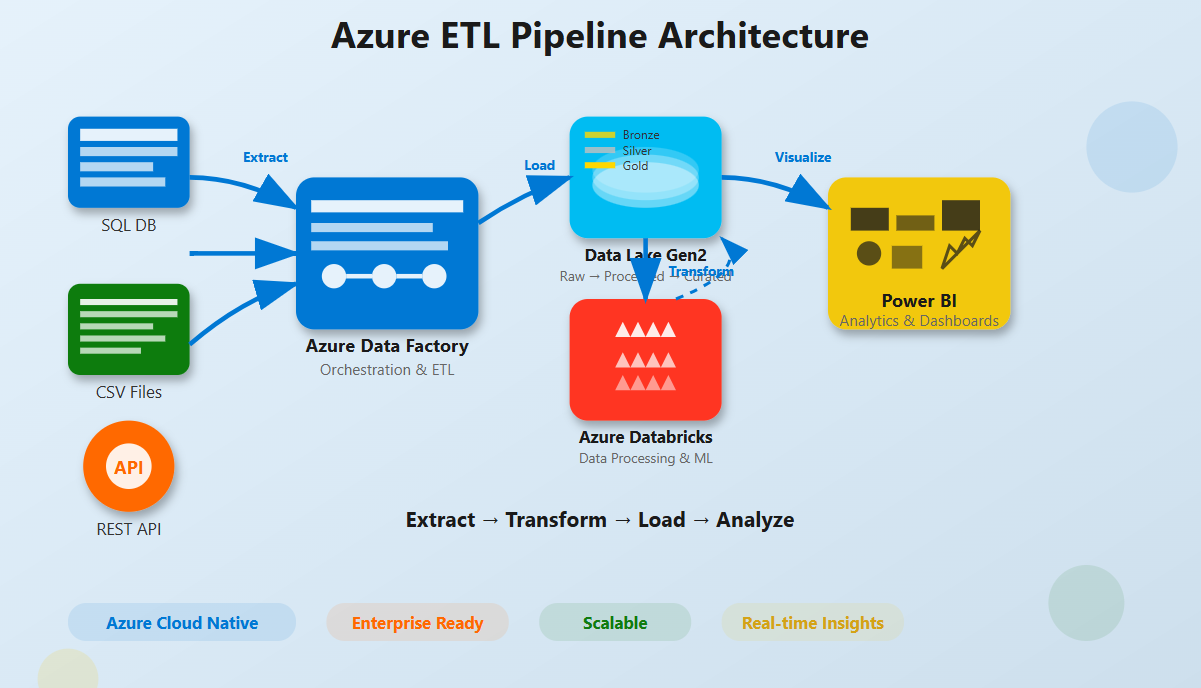
Azure Databricks is a collaborative data analytics platform built on Apache Spark. Its native integration with Azure simplifies the process of building scalable data engineering and machine learning solutions.
The platform offers:
- A collaborative workspace for data engineers and data scientists
- Optimized Apache Spark clusters
- Support for multiple programming languages
- Faster transition from prototype to production
These capabilities make Databricks a powerful solution for handling large-scale data processing and advanced analytics.
PySpark
PySpark is the Python API for Apache Spark and enables distributed data processing using Python. It allows developers to process massive datasets efficiently through parallel computing and built-in fault tolerance.
PySpark integrates seamlessly with Azure Databricks, making it a popular choice for large-scale data analytics and engineering workloads.
“Optimizing data pipelines is not just about choosing the right tools, but also about leveraging best practices to manage and extract value from data.” – Jitendra Nikhare, Hybrid Cloud, Big Data, ML, and Generative AI Solution Architect
Best Practices for Data Pipeline Optimization on Azure Using Databricks and PySpark
1. Streamlining Data Ingestion
Optimizing a data pipeline begins with efficient data ingestion. Tools such as Azure Data Factory can automate the movement of data from multiple sources into Azure Databricks.
Scheduling ingestion tasks during off-peak hours can reduce operational costs and improve overall system performance.
2. Data Transformation with PySpark
Once data is ingested, PySpark plays a crucial role in performing scalable data transformations.
Key optimization techniques include:
- DataFrame Usage – DataFrames provide faster processing compared to RDDs due to optimized query execution.
- Efficient Partitioning – Proper partitioning minimizes data shuffling and improves cluster performance.
- Data Persistence – Using
.cache()or.persist()helps store frequently accessed data in memory. - Broadcast Variables – Broadcasting small datasets reduces network overhead during joins.
3. Enhancing Scalability and Performance
Azure Databricks supports scalable data processing environments.
Important practices include:
- Dynamic Resource Allocation – Automatically adjusts cluster resources based on workload demands.
- Optimal Cluster Configuration – Selecting the right VM types depending on compute or memory-intensive workloads.
4. Implementing Monitoring and Logging
Monitoring and logging are critical for maintaining pipeline performance and reliability.
Azure Databricks integrates with Azure Monitor, enabling organizations to track system health, identify performance bottlenecks, and troubleshoot issues effectively.
5. Managing Costs Effectively
Cost control is an essential part of cloud-based data pipelines.
Organizations can reduce expenses by:
- Using Azure Spot VMs for non-critical workloads
- Automatically terminating idle clusters
- Monitoring data transfer costs across regions
Challenges in Building Efficient Data Pipelines
1. Compliance and Data Security
Data security becomes critical when handling sensitive information. Organizations must ensure pipelines comply with relevant data protection regulations.
Best practices include encryption for data in transit, strict access control policies, and adherence to compliance frameworks supported by Azure.
2. System Complexity and Integration
Data pipelines often require integration with multiple Azure services and external platforms. Ensuring seamless interoperability across systems may involve resolving network configurations, API limitations, and data format inconsistencies.
3. Resource and Skill Limitations
Building and managing modern cloud data pipelines requires expertise in cloud computing, distributed systems, and data engineering. Organizations may face challenges in hiring or training professionals with the required skill sets.
4. Scalability vs Performance Trade-offs
While Azure Databricks offers automatic scaling capabilities, balancing performance and cost can be challenging. Over-provisioning leads to unnecessary expenses, whereas under-provisioning may affect performance.
5. Maintenance and Continuous Improvement
Data pipelines require continuous monitoring, updates, and optimization. As business requirements evolve and new data sources emerge, pipelines must be adapted to maintain efficiency and reliability.
The Bottom Line
Building efficient data pipelines using Azure Cloud, Databricks, and PySpark requires careful planning, performance optimization, and continuous monitoring.
By implementing best practices in data ingestion, transformation, scalability, monitoring, and cost management, organizations can successfully manage complex data workloads.
Azure’s powerful ecosystem, combined with Databricks and PySpark, provides a modern and scalable solution for tackling today’s data engineering challenges.